
Scream if you want to go faster (scaling computer hardware)

When the deadline for registering to vote in the UK EU referendum approached there were issues with the online registration system. It stopped working due to the high numbers of people trying to register all at once. The system failed to scale and fell over. By scale, I mean that the hardware was no longer powerful enough to service all of the requests made of the software it was running and it was unable to become more powerful.

There are two main ways to scale computer hardware, vertically and horizontally. Most software can scale vertically, regardless of how it’s designed. To scale horizontally special design considerations must be taken into account.

Vertical Scaling

Imagine you’ve got 1000 people to move from point A to point B 10 miles away and a car which can hold 5 people and travels at an average speed of 60 miles an hour. That means it takes 10 minutes to get the car once from point A to point B. Ignoring the return journey and including the driver in the number of people moved, it would take 200 trips, at 10 minutes each, which is 33 hours.  That’s pretty slow.


If we use the same car, but with a more powerful engine which can travel at an average speed of 120 miles an hour, it now takes 5 minutes to get the car once from point A to point B and a total time of 16.5 hours. That’s already a good improvement.
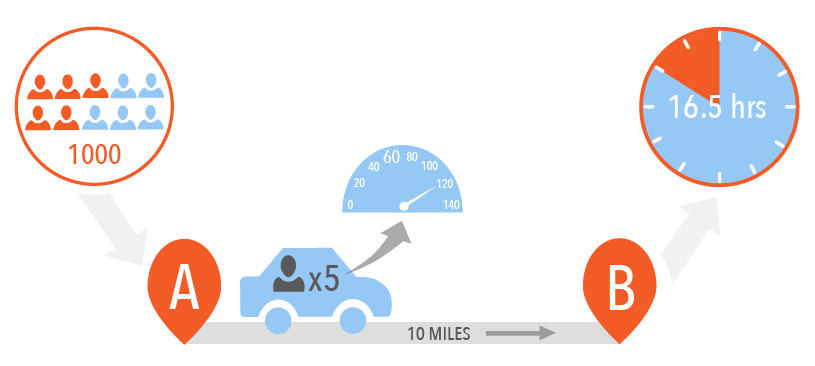

If we swap the car for a minibus which can hold 20 people and can still do an average speed of 120 miles an hour, the time comes down to 4 hours. If we continue to upgrade to more powerful engines and use bigger busses we can bring the time down significantly.


This is an example of vertical scaling. By increasing the processing power (engine) and the memory (number of people the vehicle can hold) in a computer we can increase how quickly it responds to users. However, you can only increase processing power and memory to a point. There is a threshold where it becomes impractical to scale further and another where it is no longer cost effective.

Horizontal Scaling

Imagine you’ve got the same 1000 people to move from point A to point B and two minibuses which hold 20 people each and travel at an average speed of 120 miles an hour. Both minibuses take 5 minutes to get one from point A to point B.  Ignoring the return journey and including the driver in the number of people moved, it would take 25 trips, at 5 minutes each, which is 2 hours.


If you use 4 minibuses the time comes down to 1 hour.  If we continue to increase the number of minibuses we can bring the time down significantly.


This is an example of horizontal scaling. By increasing the number of computers which are working together in parallel we can increase how quickly the overall system responds to users.

Comments

Post a Comment

Popular posts from this blog

Catalina-Ant for Tomcat 7

I recently upgraded from Tomcat 6 to Tomcat 7 and all of my Ant deployment scripts stopped working. I eventually worked out why and made the necessary changes, but there doesn’t seem to be a complete description of how to use Catalina-Ant for Tomcat 7 on the web so I thought I'd write one. To start with, make sure Tomcat manager is configured for use by Catalina-Ant. Make sure that manager-script is included in the roles for one of the users in TOMCAT_HOME/conf/tomcat-users.xml . For example: <tomcat-users> <user name="admin" password="s3cr£t" roles="manager-gui, manager-script "/> </tomcat-users> Catalina-Ant for Tomcat 6 was encapsulated within a single JAR file. Catalina-Ant for Tomcat 7 requires four JAR files. One from TOMCAT_HOME/bin : tomcat-juli.jar and three from TOMCAT_HOME/lib: catalina-ant.jar tomcat-coyote.jar tomcat-util.jar There are at least three ways of making the JARs available to Ant: Copy the JARs into th...

Write Your Own Load Balancer: A worked Example

I was out walking with a techie friend of mine I’d not seen for a while and he asked me if I’d written anything recently. I hadn’t, other than an article on data sharing a few months before and I realised I was missing it. Well, not the writing itself, but the end result. In the last few weeks, another friend of mine, John Cricket , has been setting weekly code challenges via linkedin and his new website, https://codingchallenges.fyi/ . They were all quite interesting, but one in particular on writing load balancers appealed, so I thought I’d kill two birds with one stone and write up a worked example. You’ll find my worked example below. The challenge itself is italics and voice is that of John Crickets. The Coding Challenge https://codingchallenges.fyi/challenges/challenge-load-balancer/ Write Your Own Load Balancer This challenge is to build your own application layer load balancer. A load balancer sits in front of a group of servers and routes client requests across all of the serv...

Do software engineering professionals still read? - survey results

  In order to gauge the potential audience for my book, So you think you can lead a team? , I conducted a small survey of my colleagues, co-workers and anyone from Linked. I read regularly, for work and pleasure, and assumed everyone else did too but did the responses I received confirm this? I polled 173 people, all within the software engineering field (including Product, etc), with a range of ages and years of experience in their role. What surprised me the most was that the majority of people, young or old, just starting or seasoned, still prefer reading physical books to blogs or e-readers. It also seemed that the older and more experienced were the most keen in learning more, and reading to expand or update their knowledge.  When it comes to reading habits between different roles the survey showed that software engineers and team leads read more regularly for their career than other roles, with 55 years old and over and 16+ years experience being the biggest readers over...